WherePDF

Rotate PDF guide

How to rotate PDF pages and fix orientation

A sideways scan can make an otherwise usable PDF hard to read or print. Rotate only the affected pages instead of changing the entire document.

Open Rotate PDF

No account required. This tool processes your file on this device.
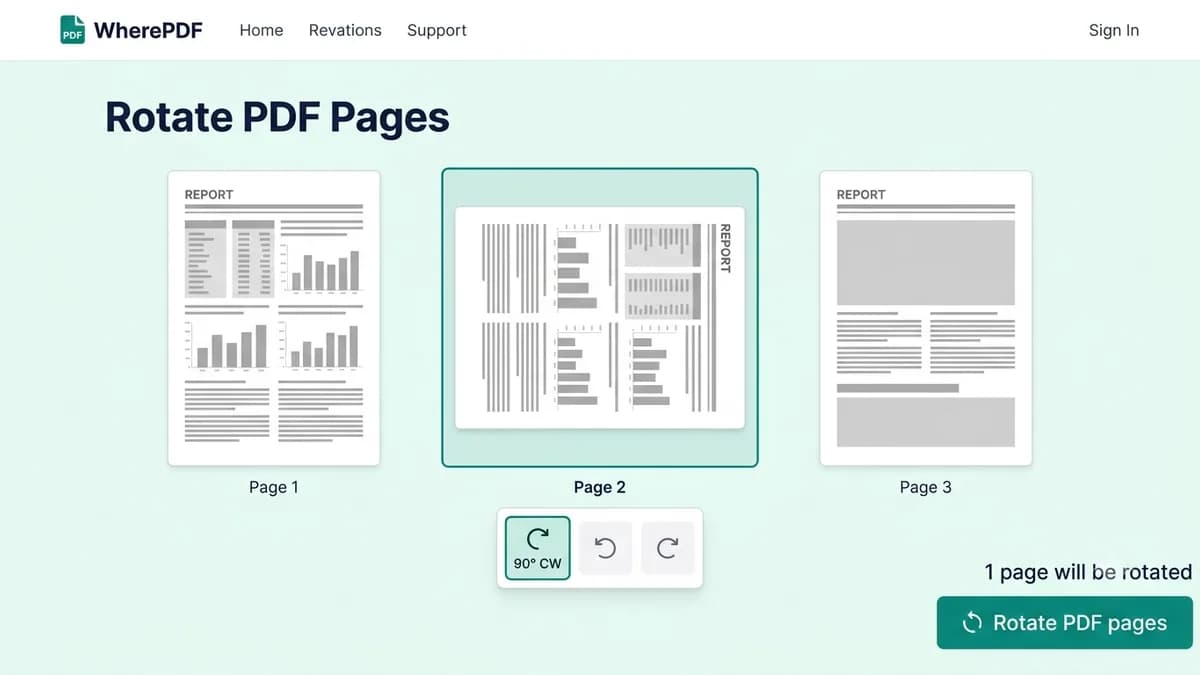
WherePDF Rotate PDF screen showing a selected sideways page and rotation control

The process

Complete it in three steps

  1. 1

    Open Rotate PDF

    Choose the PDF with pages that need to be turned. The tool opens a thumbnail preview of the document.

  2. 2

    Choose pages and rotation

    Select one or more pages, then rotate them in 90-degree steps until the preview is upright.

  3. 3

    Download the corrected file

    Apply your rotation choices, select Rotate PDF pages, and save the corrected PDF.

Common questions

Can I rotate only one PDF page?

Yes. Select only the page that needs a new orientation.

Can I rotate scanned PDF files?

Yes. A scanned PDF can be rotated as long as it opens as a valid PDF.

Will rotating a PDF reduce quality?

No. Page rotation does not rasterize the PDF content.